Mastering Audio Slicing in FL Studio: A Step-by-Step Guide for Producers
Audio slicing in FL Studio isn’t just about chopping up samples—it’s about transforming raw sound into dynamic, reusable elements that breathe life into your tracks. Whether you’re working with vocal chops, drum loops, or synth textures, precise slicing gives you control over timing, pitch, and groove, turning a single take into a versatile toolkit. The key lies in understanding how to slice audio in FL Studio with purpose, not just mechanically. This approach separates amateur edits from professional production, where every slice serves a rhythmic or melodic purpose rather than just filling space.
Why Slicing Audio Matters in Modern Production
Audio slicing is the backbone of many modern production techniques, from hyperpop’s glitchy vocal chops to hip-hop’s meticulously edited drum breaks. The difference between a generic loop and a standout sample often comes down to how cleanly and creatively you’ve sliced it. In FL Studio, this process isn’t just about cutting—it’s about preserving the integrity of the original sound while unlocking its full potential. For example, a poorly sliced vocal line might sound disjointed, while a well-edited version can sync perfectly with a beat, adding depth and texture without overpowering the mix.
Setting Up Your Audio for Slicing
Before you begin slicing, preparation is everything. Start by importing your audio into FL Studio’s Playlist or Sample Editor. If the track has a strong tempo, sync it to your project’s BPM—this ensures your slices align with the grid, making them easier to manipulate later. For vocal samples, consider normalizing the audio to avoid clipping during playback. Producers often use plugins like Fruity Parametric EQ 2 to clean up unwanted frequencies before slicing, which saves time in the mixing stage. Remember: a well-prepared audio file slices more smoothly and retains better quality.
Choosing the Right Tools for Slicing
FL Studio provides two primary ways to slice audio: the Sample Editor and the Playlist. The Sample Editor is ideal for detailed editing, where you can manually place slice markers and adjust envelope points. For quicker workflows, the Playlist’s Slice View lets you drag and drop audio regions into individual slices with a few clicks. Each method has its strengths—Sample Editor offers precision, while Playlist excels in speed. Many producers use both: they slice in the Sample Editor for fine-tuning and then drag the results into the Playlist for arrangement.
For advanced control, plugins like Fruity Granulizer or Sytrus can further refine slices by applying granular effects or pitch-shifting. These tools are especially useful when working with organic sounds, like vinyl crackles or field recordings, where subtle textures can add character to your track.
Technique: How to Slice Audio in FL Studio Without Losing Quality
The art of slicing lies in balance—cutting at the right moments while preserving the natural flow of the sound. For vocal chops, align slices on the beat or phrase boundaries to maintain rhythmic cohesion. If the audio has a repeating pattern, like a drum loop, slice at the natural breaks where the sound resets. Avoid cutting mid-transient (like the "thwack" of a snare hit), as this can introduce artifacts or unnatural gaps.
When slicing, pay attention to the crossfade settings. A well-crossfaded slice blends seamlessly into the next, while a harsh cut can disrupt the listening experience. In FL Studio, you can adjust crossfade lengths in the Sample Editor’s Envelope tab or by dragging the fade handles in Playlist. For a more organic feel, some producers use reverse crossfades or apply subtle volume automation to slices.
Working with Slices: Arrangement and Effects
Once sliced, your audio becomes a modular toolkit. In the Playlist, you can drag slices into different patterns, stack them for layered textures, or reverse them for rhythmic variation. For example, a single vocal phrase can be split into four slices—one for each beat—and then randomized in pitch or timing to create a glitchy effect. This technique is commonly used in electronic music to add unpredictability while keeping the melody intact.
Effects like Fruity Delay 3 or Sytrus can transform slices into something entirely new. A delayed vocal slice might become a haunting echo, while a pitch-shifted drum slice can add harmonic depth. The key is experimentation—try applying effects to individual slices rather than the entire sample to maintain clarity.
Common Pitfalls and How to Avoid Them
Even experienced producers hit snags when slicing. One frequent mistake is over-slicing, where too many cuts create a choppy, unnatural sound. The solution? Keep slices as long as possible while still serving a purpose. Another issue is phase cancellation, where slices play out of sync and cancel each other’s frequencies. To fix this, ensure all slices are aligned to the same phase reference or use a phase-correlation tool like Fruity Phase Meter.
Finally, don’t neglect the importance of bounce quality. When exporting sliced audio, use high-bitrate settings (like 24-bit WAV) to preserve clarity. Many producers also apply a light limiter or compressor to slices before finalizing the mix to prevent dynamic inconsistencies.
Final Thoughts: Slicing as a Creative Process
Slicing audio in FL Studio is more than a technical skill—it’s a creative process that turns limitations into opportunities. Whether you’re editing a vocal sample for a hip-hop beat or chopping up a synth pad for ambient textures, the way you slice dictates the emotional and rhythmic impact of your track. The best producers don’t just cut audio; they reshape it, turning raw material into something uniquely their own.
Triangular Based Pyramid - GCSE Maths - Steps & Examples
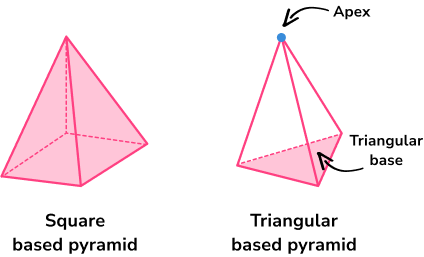
Triangular Based Pyramid - GCSE Maths - Steps & Examples